AI Influencer Dance Videos: A Practical Look at Trend-Based Content Creation
By Emre Danisan · Founder of Danex AI, Artificial Intelligence Expert
Create an AI influencer dance video with reference clips, trend templates, and short-form workflows for TikTok, Reels, and social content.
AI influencer dance videos work best when motion from a trend reference is applied to an existing persona still, keeping the same face across clips. Danex AI Influencer Generator’s Viral Trend Studio is built for that: pick a trend, transfer motion, and reuse the character for Reels and TikTok.
TL;DR: AI influencer dance videos
An AI influencer dance video gives creators and brands a faster way to test TikTok-style dance trends without filming a new creator every time. You build one AI persona, apply reference clips or trend templates through AI Viral Trend Studio, and publish short-form motion content across Reels and Shorts. Danex.ai focuses on repeatable workflows - create the character once with Generate AI Persona, then reuse it for trend-based clips.
TikTok will burn a dance in three days. By the time you've booked talent, the sound is dead.
That's the clock an AI influencer dance video is built for. One face. A reference clip for the movement. A short vertical you can ship while the audio still has air. Danex AI runs that loop: character once via Generate AI Persona, motion via AI Viral Trend Studio. Not magic. Not a virality button. A way to test the format before you spend on another shoot.
On this page: AI influencer dance videos
- Why dance content became a core format on TikTok
- How a reference-based AI influencer dance video works
- Where an AI influencer dance video fits in a creator workflow
- AI influencer dance content still has real limits
- Why AI creators are using dance formats specifically
- Using AI reels generation for multi-platform content
- What digital marketers should pay attention to
- Testing trend-based workflows without overbuilding
- Choosing the right reference video
- What makes an AI influencer dance video feel natural
- Why consistency matters for virtual influencers
- AI animation vs AI influencer content
- Where dance videos help marketing teams
- Common mistakes creators keep making
- The current state of AI reels generation
- Should creators worry about trend saturation?
- A practical way to start
- Final thoughts
- FAQs
Why dance content became a core format on TikTok
Viewers already know the shape. Music. Movement. Hook in the first second. Visual rhythm carries the rest.
That template is why dance remixes easier than a talking-head script. Brands noticed. Creators noticed. Production still got expensive the minute you wanted the same person every week.
You'd stack recurring shoots, talent, edits, wardrobe, locations, then a pile of recuts. It adds up. A generated character doesn't need to be filmed again. You make the persona once and reuse it.
Stills are easy now. Movement is the part that used to fall over. Reference-based systems exist because of that gap.
How a reference-based AI influencer dance video works
You start with a clip that already has the choreography. That upload is the motion guide. The generated character tries to follow gestures, body positions, timing, and pacing.
That's AI Viral Trend Studio in practice.
Danex AI's public feature page lists the steps: pick an existing influencer image, grab a clip from the Trending Library (or upload your own), optionally add a short prompt, generate a short-form motion clip.
Image, trend reference, generate. Library clips ship with motion-transfer settings already curated, so you're not sitting in Match Video vs Match Image guesswork. Custom uploads use the default motion-first setting.
The tradeoff still lives under the hood. Push motion harder and choreography tracks closer, but the face can drift. Protect the image and identity holds, with softer movement. Danex picks that per trend clip instead of making every user guess.
Where an AI influencer dance video fits in a creator workflow
Once you have that transfer step, the rest of the pipeline only works if the person already exists. Treat the dance clip as a stage, not a one-off toy.
Create an AI influencer persona
Generate the character first: face, style, niche, clothing direction, tone, visual identity. That file is the identity you reuse.
Generate static content
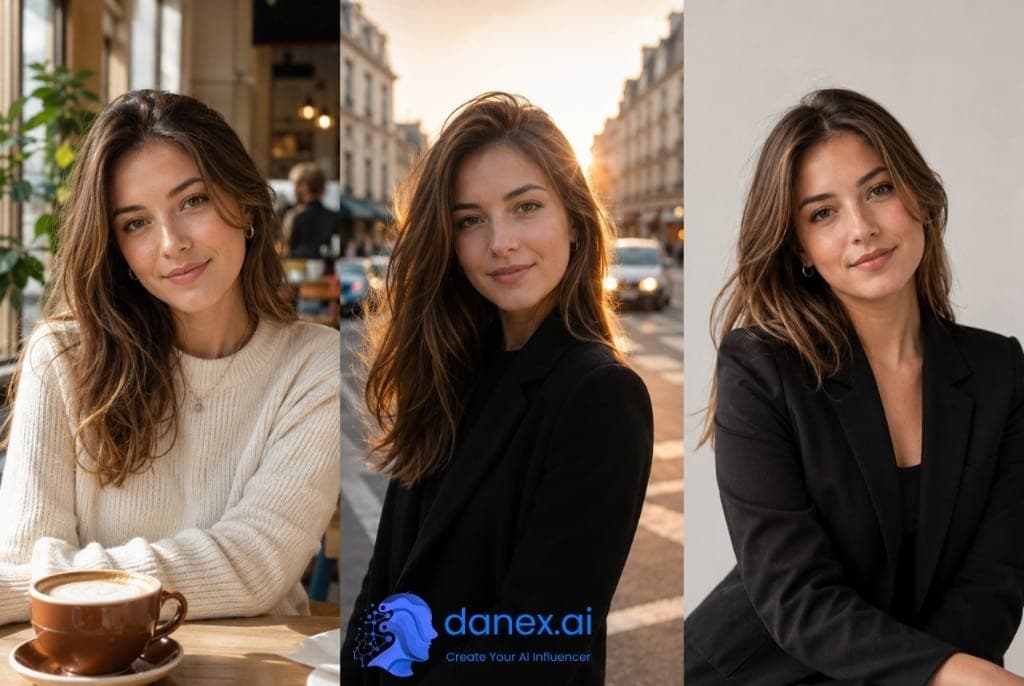
Before you animate, test the face in stills. Profile photos, Instagram-style posts, thumbnails, campaign comps, product placements. If the stills don't look like one person, the dance clips won't either.
Build short motion clips
Then movement. You apply a reference performance to that image. AI Viral Trend Studio is this stage. TikTok-length. Reel pacing. Not a cinematic scene.
That's a feature. Trend content dies on duration. It lives on speed.
The role of the Trending Library
A lot of generators stop at "make a video." You still have to hunt a usable reference.
Danex AI keeps trend clips inside the workflow, each with curated motion-transfer settings. You pick a trend and generate. Convenience, not a promise the clip will hit.
What you skip: sourcing, prepping references, formatting examples, rebuilding prompts, guessing settings per trend. Agencies running several personas feel that time cut first.
AI influencer dance content still has real limits
This is the honest part, now that you know the pipeline.
Fast spins, complex hands, overlapping limbs, crowded scenes, nasty camera angles: movement still breaks. Short-form viewers clock weird motion immediately. TikTok is unkind.
You still pick. Slower references often clean up better than a chaotic high-energy trend. Sometimes you reroll with a different clip. Normal.
The useful bit is iteration speed. Compare outputs the same afternoon instead of booking Tuesday's studio.
Why AI creators are using dance formats specifically
Talking-head needs a script and a personality. Dance needs timing, pacing, and a format the feed already understands. That's a lower bar for a virtual face to join a platform-native trend.
You skip studio lighting, a physical creator, location, and repeat filming. You do not skip taste. Bad trend picks kill reach faster than a slightly soft render.
And stop chasing "perfectly human." A bit of stylization often plays better because people already know it's generated. Trying too hard reads as a cover-up.
Using AI reels generation for multi-platform content
You've got a vertical dance clip. It rarely stays on TikTok.
Same file becomes an Instagram Reel, a YouTube Short, an X post, a Pinterest pin. That's why AI reels generation is practical: one motion idea, several crops, same influencer identity.
Brands feel this more than solo creators. Localized versions, alternate styles, different hooks, platform-specific trims, without recasting the person. Danex AI is aimed at that repeatable loop, not a one-off cinematic render.
What digital marketers should pay attention to
The clips exist. The operational question is whether you can test enough variations before the trend window slams shut.
Approval cycles and shoot schedules are how you miss it. Reference-driven workflows shorten the gap. Not to zero. Enough to matter.
Stay adult about the rest: weak strategy stays weak. Timing, hooks, captions, editing still decide. The tool speeds production. It doesn't pick the sound for you.
Testing trend-based workflows without overbuilding
Don't stand up a whole virtual brand on day one.
Three movement styles. Retention. Pacing tweaks. Character styling. Comments. Repeat. That's more signal than "automate the influencer."
Danex AI is built for that kind of iteration, not autonomous publishing. Safer, honestly. Review AI Viral Trend Studio and run two reference clips against the same face.
Sign up for Danex AI if you want to compare outputs across trend formats yourself.
Choosing the right reference video matters more than most settings
Once you're testing, the lever isn't the prompt. It's the reference.
You want readable body positions, stable pacing, visible arms, simple framing, a quiet background. Complicated choreography usually makes worse output. Surprises people.
A slower dance with clean transitions often beats a high-energy trend full of cuts, especially if the face has to hold. Front-facing transfers cleaner than aggressive side angles or overheads. That's image-to-motion in general, not a Danex quirk.
Think like an editor.
What makes an AI influencer dance video feel natural
If the reference was clean and the clip still feels off, look at rhythm, not resolution.
People move with tiny pauses, uneven timing, weight shifts, a little hesitation. Generated clips can look too smooth or glued to a path. That's the uncanny complaint.
What usually helps: simpler movement, shorter clips, slower transitions, controlled framing, less aggressive choreography. Less chaos.
TikTok already rewards repetition and a beat you can clock in two seconds. That's why this format fits the tech.
Why consistency matters for virtual influencers
A single weirdly good clip is easy. A recognizable person is the actual product.
Hair, clothes, facial structure, little personality cues, how you post. Without those, you don't have an influencer. You have a random generated extra.
Danex AI starts motion from a previously generated image so the dance stays tied to a reusable persona. That's how you get branding, familiarity, campaign continuity, thumbnails that match. Agencies running multiple virtual personalities need that or the accounts blur together.
The difference between AI animation and AI influencer content
Animating an image is a feature. Influencer content is platform behavior: trend timing, relatable framing, formats you can repeat, a posting cadence, a face people remember.
A polished cinematic clip can lose to a simpler vertical dance that feels native. Short-form audiences pick familiar pacing over visual perfection. That's why trend-replication tools exist. Platforms pay you for structures they already understand.
Yes, that can feel repetitive. That's also how the ranking systems behave.
Where an AI influencer dance video helps marketing teams
Before you spend on a real production, you can test the concept.
Visual direction, whether the trend even fits, pacing, thumbnails, a little audience response, style variants. Then you decide if a shoot is worth it.
You're cutting experiment cost. Smaller teams feel this more: no dedicated editor, no studio on retainer, no creator contract, no crew. Fast tests become an ops tool, not a creative hobby.
A few mistakes creators keep making
Long prompts, chaotic references, fake-skin realism, and posting the raw file. Those four show up constantly.
Using overly complex prompts
Long prompts don't save a bad reference. Short, focused instructions usually win in motion workflows.
Choosing chaotic reference clips
Fast cuts and crowded backgrounds confuse transfer. Cleaner refs help.
Trying to mimic human realism too aggressively
Viewers know. Slight stylization often feels less fake than a perfect-skin cover-up.
Ignoring editing after generation
Still cut. Captions. Sound timing. Trim. Format for the repost. Raw dumps rarely work.
The current state of AI reels generation
Improving fast. Still early.
Best fit today: short clips, controlled movement, trend adaptation, vertical, social-first. Long-form storytelling still falls apart when motion has to hold across a long scene.
Dance sidesteps a lot of that. Brief clips. Repetitive pacing. Audiences who already expect quick cuts. Stylization that's allowed. The format matches what the models can actually do.
Should creators worry about trend saturation?
A little. Yes.
When everyone uses the same library clip, feeds go identical. Human creators already have this problem.
Use the trend as structure. Change pacing, styling, framing, combine references, bend the tone toward your niche. Interpretation beats duplication. That rule doesn't expire because the dancer is generated.
A practical way to start using trend-based AI video tools
Don't build an empire.
One character. One niche. One dance format. Short clips. A few reference styles. Then watch retention and comments. Niches disagree about virtual creators. You'll learn faster by posting than by writing a 40-page plan.
Final thoughts on AI influencer dance videos
If you want to try this, open AI Viral Trend Studio with one persona and two reference clips: one clean and front-facing, one more chaotic. Keep the one that holds the face.
Trend pick, edit, and pacing are still yours. The studio is there so you can run that test this afternoon instead of next month's shoot.
Sign up for Danex AI and compare movement styles against your actual posting cadence.
AI influencer dance videos FAQs
What is an AI influencer dance video?
An AI influencer dance video applies motion from a reference clip - gestures, timing, and pacing - to a static AI-generated character image. The result is short-form TikTok or Reels content without filming a human creator for every trend.
How does a reference-based AI dance video workflow work?
You select an existing AI influencer image, choose a Trending Library clip or upload your own reference, optionally add a prompt, and generate a short motion clip. Danex.ai AI Viral Trend Studio applies motion-transfer settings curated for each library trend so you can focus on picking the right reference.
What are the limits of AI influencer dance content?
Movement quality can break on fast spins, complex hand motion, overlapping limbs, crowded scenes, and difficult camera angles. Slower, front-facing reference clips with clean framing usually produce more usable output than chaotic high-energy trends.
Why do creators use dance formats for AI influencers?
Dance trends are predictable in structure and flexible in style. Viewers understand the format within seconds, which makes it easier for virtual influencers to participate in platform-native trends without studio shoots or location planning.
Does the reference video matter more than prompts?
Usually yes. A clean reference with readable body positions, stable pacing, visible arm movement, simple framing, and few background distractions gives motion systems clearer data than long or complex text prompts.
Can one AI influencer dance clip work across platforms?
Yes. TikTok-length vertical clips can be adapted for Instagram Reels, YouTube Shorts, X posts, and Pinterest video pins while keeping the same AI influencer identity across channels.
What mistakes do creators make with AI dance videos?
Common issues include overly complex prompts, chaotic reference clips with fast cuts, trying to mimic human realism too aggressively, and publishing raw outputs without pacing edits, captions, sound timing, or trimming.
How does Danex AI fit into this workflow?
Danex.ai lets you create a persona with Generate AI Persona, build static content with Be Anywhere You Want, then turn that character into trend-style motion clips with AI Viral Trend Studio - all without rebuilding the persona each time.